Dashboard
The real picture at a glance: pending invoices, approval and payment delays, amounts at stake and each approver’s workload.

Our work
Here is what we build for our clients: an invoice management application, SharePoint intranets, custom components and business applications. AI-accelerated development is what lets us deliver in days what used to take weeks.
Accounts payable · Microsoft 365
In many SMBs, invoices arrive by email, approvals sit in inboxes and nobody really knows where things stand. We built an application that lives in your Microsoft 365: the PDF comes in, its data is extracted, the invoice follows its approval chain based on the amount, then comes out paid, stamped and archived. Everything is traced.
Five steps, one flow
The screens
Click a screenshot to enlarge it.
The real picture at a glance: pending invoices, approval and payment delays, amounts at stake and each approver’s workload.
Drop the PDFs and SharePoint AI extracts the data: supplier, number, amount, date. You compare it with the document, and nothing goes to approval before you confirm.
The document and its metadata side by side, the approval chain triggered by the amount, delegation and the full timeline. Everyone does their part in the application, and a daily email reminder sums up the pending requests.
Numbers that speak: suppliers, months, amount brackets, projects. One click on a chart filters the whole page, without Power BI.
Roles and permissions
Menus and invoices adjust to the role of the signed-in person. A project manager approves their invoices and follows their projects; the financial controller sees everything, receives, configures and analyzes.
Every invoice, PDF receiving, approval level configuration, the log and the indicators.
A menu reduced to the essentials: their dashboard, their invoices, their approvals and the archives. Some invoices may be hidden from them when they are not involved.
No extra software: the application lives in SharePoint, with your accounts and your permissions. Data extraction from PDF invoices relies on SharePoint AI.
Already in production. It replaces emails, Excel workbooks and lost invoices. It complements your accounting software without replacing it.
We start from a proven base that speeds up delivery, then adjust it to your approval levels, your projects and your specifics.
Our intranet kit
After more than twenty years designing intranets, you see the same gaps come back with every client. So we did a small in-house project: the four web parts that, in our experience, should ship with SharePoint. A message from leadership, a personalized welcome, team birthdays and a quick poll. Nothing revolutionary, just what is missing, done properly. Designed and tested in two days with Claude Code. And if Microsoft wants to borrow the idea, a lot of people would be happy.
No Graph API, no Azure. Deployment requires no intervention in Entra.
All four web parts ship in a single .sppkg file, ready for SharePoint Online. A provided script creates the required lists.
Two built-in styles or the colours of your SharePoint site theme, chosen per web part.
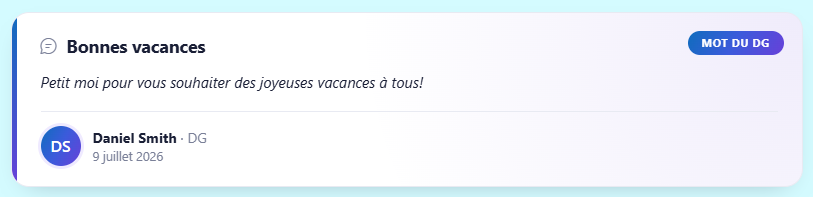
A message from leadership, featured at the top of the home page with photo and signature. Messages come from a SharePoint list: prepare them ahead of time and each one shows between its start and end dates.

Greets every employee by first name, with "Good morning" or "Good evening" depending on the time of day and a short mood message that changes on every visit. A human touch as soon as the intranet opens, with no list to create.
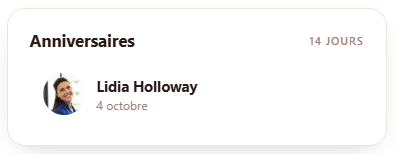
Upcoming team birthdays for the next few days, with profile photo and a highlight on the day itself.
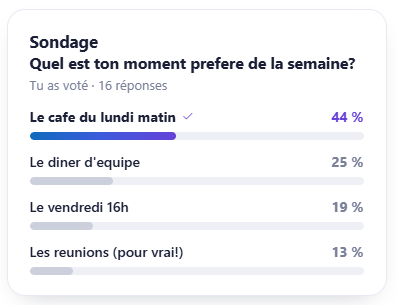
One question, a few choices, live results. Everyone votes once, confidentially. Perfect for taking the pulse of the team without launching a full survey.
Property pane
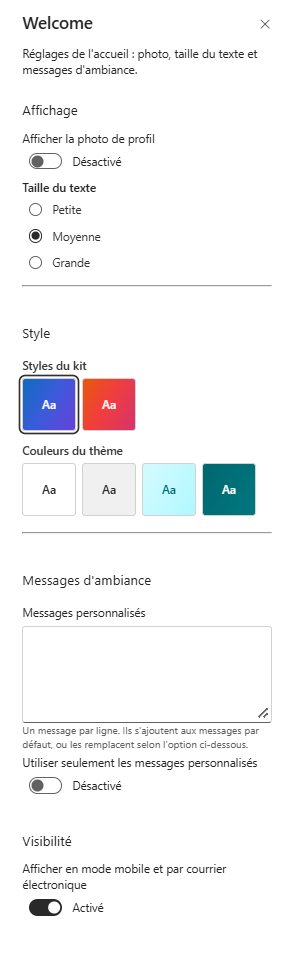
An example with the welcome web part: every option lives in the standard property pane, the one your communications team already knows.
Case studies
Business applications, delivered or in progress for our clients.
This SMB tracked its bids, orders and job sites in Excel files and emails, with no overview and no reminder when a purchase order was running late.
A custom application, built with SPFx and React in SharePoint Online, that follows every file from the call for tenders to the end of the work: bid pipeline, won projects, purchase orders and deliveries, planned labour and invoicing. A Gantt calendar shows the orders expected, and reminders flag what is late before it holds up the site.
At this construction contractor, every job site goes through a series of disbursements: request, appraiser assigned, report, funds at the notary, funds released. Follow-ups were done by email, and upcoming cash flow was a mental estimate.
A custom application, built with SPFx and React in SharePoint Online, that follows each disbursement request step by step and projects receipts on a calendar: on time, to watch or late. A shared mailbox is read by a Power Automate flow: AI (AI Builder) summarizes each email, links it to the right file and suggests the action to take, with its confidence level. Nothing changes without your confirmation. Reminder emails are automated and sent after confirmation. A complete dashboard covers every project.
And behind it all: more than twenty years of intranets, including more than ten large-scale ones for Quebec cities, insurers and private companies. Our story